
![User Onboarding Software for SaaS: The Complete Buyer's Guide [2026]](/images/blog/user-onboarding-software-saas-featured.png)
86% of customers are more likely to stay when onboarding is clear. Most onboarding isn't clear.
Here's the pattern I've seen across dozens of SaaS teams: they spend weeks building beautiful in-app tours and onboarding checklists. Then they ship a product update. The tour breaks. The screenshots are wrong. The steps don't match the new UI. Nobody notices for weeks. Users get confused, blame themselves, and quietly stop using the product.
The tools weren't the problem. The stack was incomplete.
This guide covers the best user onboarding software for SaaS in 2026, plus the evaluation framework most buyers skip. You'll see 10 tools compared side by side, a two-layer framework for building onboarding that survives product changes, and the documentation layer that almost every team forgets to build.
What Is User Onboarding Software?
User onboarding software helps SaaS companies guide new users from signup to their first meaningful win. It includes any tool that helps users understand your product, complete key actions, and build habits around your core features.
The category is broad. It covers in-app tooltips and walkthroughs, onboarding checklists, interactive product tours, contextual help, and the documentation that supports users after the initial setup. Good onboarding software gets users to value fast and keeps them there.
Why it matters
The data is clear: companies with structured onboarding programs see 20-30% reductions in first-90-day churn. Effective onboarding increases product usage by 30% and cuts churn by 20% year over year.
Users who don't reach their "aha moment" within the first week usually don't come back. They don't cancel dramatically. They just stop logging in. Onboarding software is what stands between a signed-up user and an activated customer.
The hidden gap: in-app guidance vs. ongoing documentation
Here's what most buyers miss.
In-app guidance tools (tooltips, tours, checklists) are great at showing users what to do right now. They work brilliantly for first-time flows and activation steps. But once the tooltip closes, what happens?
Users hit a wall. They try to recall the step. They go to your help center and find outdated screenshots. They open a support ticket.
The problem is that most user onboarding software only covers the first layer. The second layer, embedded documentation that supports users throughout their entire lifecycle, gets built separately, or not at all. We'll come back to this.
The Two Layers Every SaaS Onboarding Stack Needs
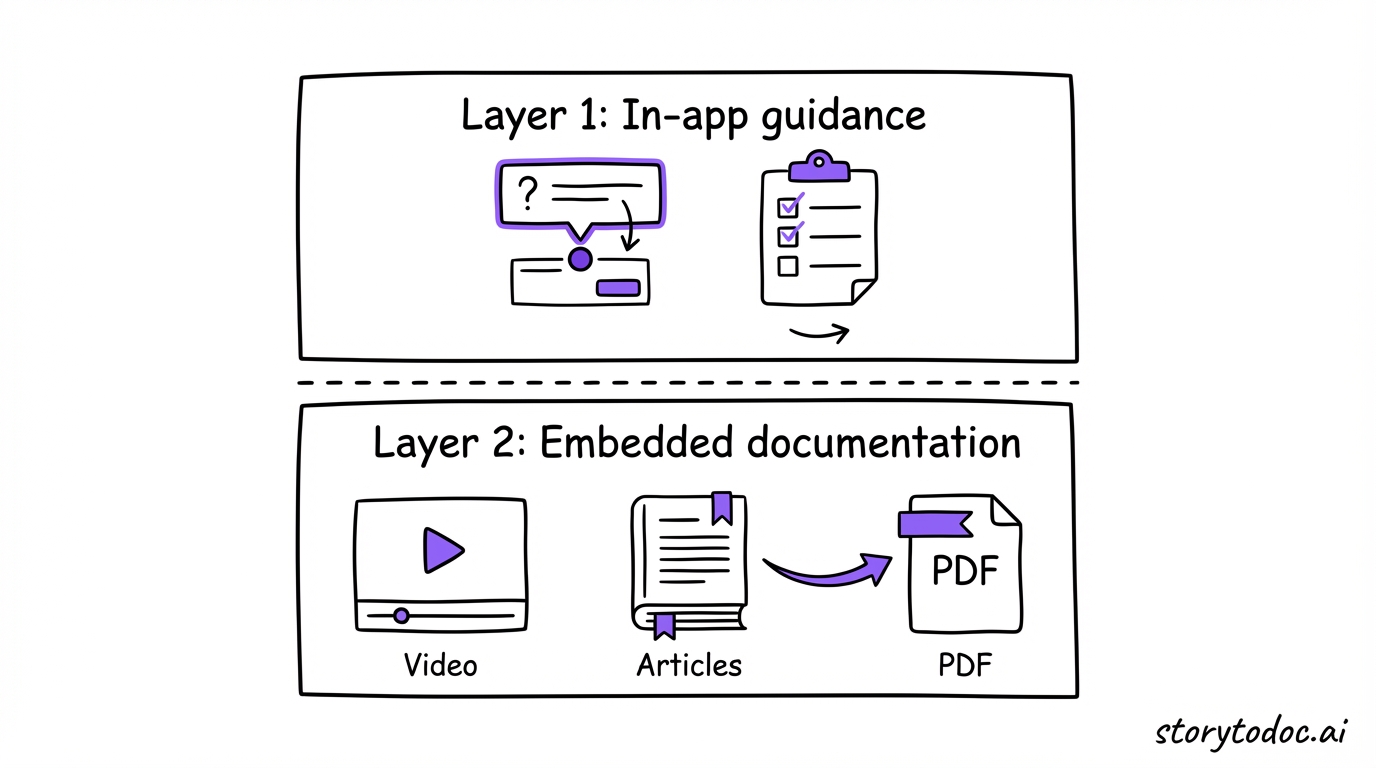
The best-performing SaaS onboarding stacks aren't built on a single tool. They're built on two layers that work together.
Layer 1: In-app guidance (show users the path)
Layer 1 is everything that happens inside your product during the first session. Tooltips that highlight key features. Checklists that guide users through their first workflow. Modals that explain what a feature does before someone clicks it. Progress bars that show how far they've come.
These tools are reactive to what users are doing right now. They meet users in the moment. This layer is essential, and most SaaS teams have invested here.
Appcues, Userpilot, Pendo, Chameleon, and similar tools all live in this layer.
Layer 2: Embedded documentation (support the journey)
Layer 2 is what users reach for when they're not in an onboarding flow. It's the help center article they search when they're stuck. The how-to video they watch when a tooltip isn't enough. The PDF guide they download before a team training session.
Most SaaS teams treat this as a separate project. They write some help articles, maybe record a few screen captures, put them in Zendesk, and call it done. Then they ship a product update.
Suddenly the screenshots in those articles don't match. The steps are wrong. The videos show the old UI. And users have no idea if the content is current or stale.
Layer 2 onboarding documentation needs to update automatically when your product changes. Otherwise it becomes a liability, not an asset.
Why most teams only build Layer 1 (and what it costs them)
Building Layer 1 is easier. The tools are excellent. The feedback loop is fast. You add a tooltip, watch the activation rate go up, feel good about it.
Layer 2 is slower. Writing help documentation is tedious. Updating it when the product changes is more tedious. Most teams deprioritize it until users start complaining.
Here's the cost: 80% of SaaS help docs go stale within months of a product launch. Users who land on wrong or outdated documentation lose trust fast. And users who only discover 20-30% of what your product can do are at permanent churn risk, regardless of how good your in-app tour was.
Sound familiar?
How to Choose User Onboarding Software
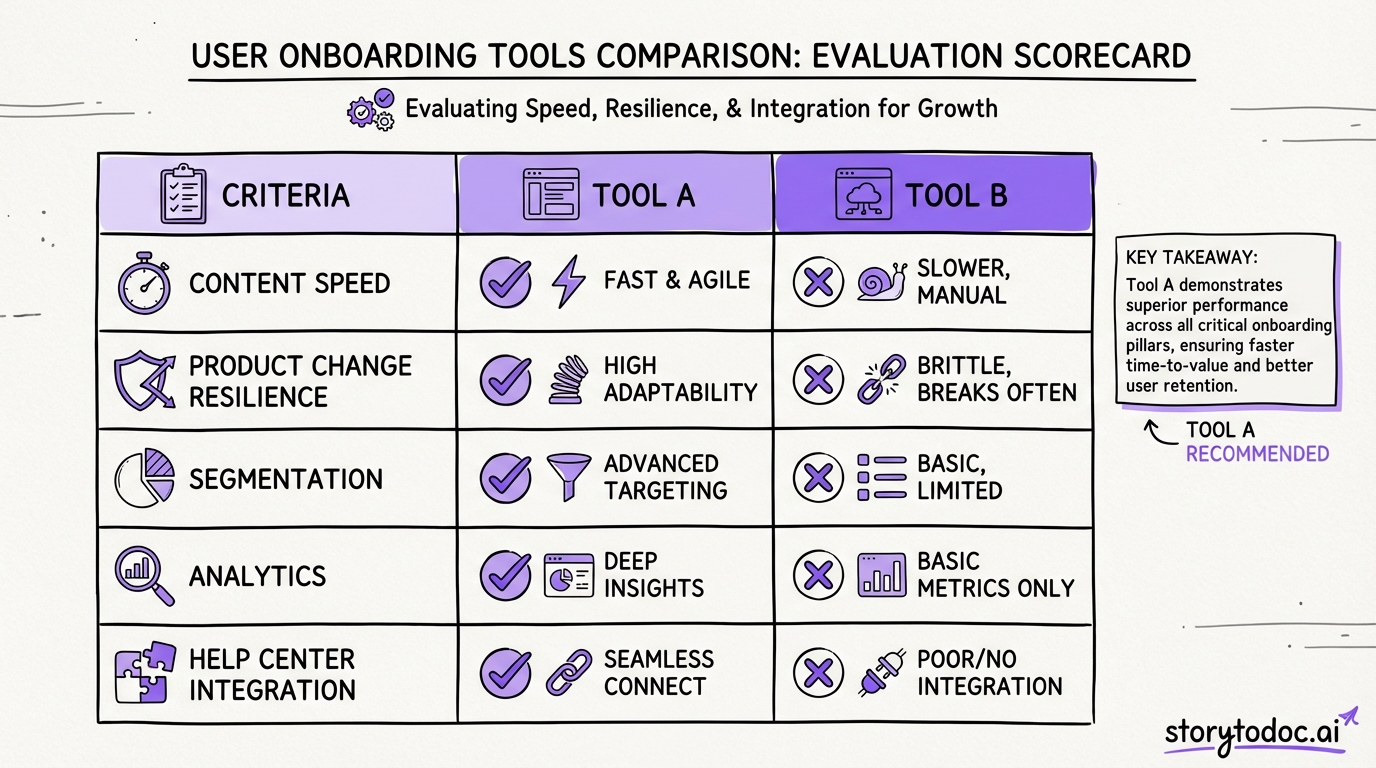
Before you pick a tool, use this framework. It will save you from buying something that works for your current state but breaks as you grow.
5 criteria that actually matter
1. Content creation speed. How long does it take to build a new onboarding flow? The best tools let a non-technical team member create and publish a new tour in under 30 minutes. If you need engineering involvement every time, it won't get used.
2. What happens when the product changes. This is the question nobody asks vendors. When your UI updates, does the onboarding content break automatically or update automatically? Most tools do the former.
3. Targeting and segmentation. Can you show different onboarding flows to different user segments? A new user and a power user who just bought an add-on need completely different experiences. Look for role-based, plan-based, and behavior-based targeting.
4. Analytics. What metrics can you track? Good onboarding analytics show you completion rates by step, drop-off points, feature adoption rates, and the correlation between onboarding completion and 30-day retention. Avoid tools that only show "was the tour viewed."
5. Integration with your help center. Users move between your product and your help center constantly. The best onboarding stacks have these two layers talking to each other. Check whether the tool integrates with Zendesk, Intercom, or wherever your documentation lives.
Questions to ask before you buy
- Does this tool support our current tech stack without custom development?
- What happens to our flows when we update the product UI?
- Can we A/B test different onboarding sequences?
- How does the tool handle different user segments or plan tiers?
- What does the analytics dashboard look like, and does it connect to our CRM?
- What's the actual implementation timeline, not the sales pitch timeline?
Small team vs. enterprise considerations
Small teams (under 50 employees) need tools that are fast to implement, easy to maintain without a dedicated team, and priced for their stage. Guideflow and Userflow are worth evaluating here.
Mid-market and enterprise teams need deeper segmentation, more robust analytics, compliance features, and integrations with existing CS tooling. Pendo, WalkMe, and Whatfix are built for this scale.
10 Best User Onboarding Software Tools for SaaS [2026]
1. Appcues
Best for: Mid-market SaaS teams wanting no-code onboarding flows Pricing: From $249/month
Appcues is the go-to for product-led growth teams who want to build onboarding flows without engineering help. Its visual builder lets you create tooltips, checklists, modals, and NPS surveys that trigger based on user behavior. The targeting is solid for mid-market: you can segment by user role, company size, plan tier, or custom attributes.
It doesn't require coding, which means your CS or product team can iterate quickly. The limitation: like most in-app guidance tools, Appcues creates content that doesn't update when your product UI changes. You manage that manually.
2. Userpilot
Best for: SaaS teams who need deep personalization and A/B testing Pricing: From $249/month
Userpilot is stronger than most tools on segmentation and experimentation. You can build highly customized onboarding experiences based on user behavior, run A/B tests on different flow sequences, and track activation metrics at a granular level. Its analytics dashboard shows you exactly where users drop off.
Good choice for teams that treat onboarding as an ongoing experiment, not a one-time build.
3. Pendo
Best for: Enterprise teams who want product analytics and onboarding in one platform Pricing: Custom (enterprise-tier pricing)
Pendo combines product analytics with in-app guidance. You get behavioral heatmaps, usage analytics, NPS, and onboarding flows all in one place. This is valuable for enterprise teams who need to understand what features users actually use before deciding where to build onboarding.
The tradeoff is complexity and cost. Pendo takes longer to implement and is priced for teams with dedicated product operations resources.
4. Chameleon
Best for: Teams who want onboarding that looks native to their product UI Pricing: From $279/month
Chameleon's main differentiator is design. Its onboarding elements don't look like third-party overlays. They look like part of your product. If you've ever seen a Chameleon-powered tooltip, you'd think it was hard-coded.
Good for teams where brand consistency inside the product matters. The analytics are less comprehensive than Pendo but solid for most needs.
5. Intercom
Best for: Teams who want to blend conversational support with onboarding Pricing: Custom (based on seats and usage)
Intercom built its name on messaging but has expanded significantly into onboarding. You can trigger in-app tours, product announcements, and behavioral messages from the same platform you use for support. For teams already using Intercom, the onboarding features are worth exploring before adding another tool.
The limitation: it's a support platform first. The onboarding capabilities are good but not as deep as tools built exclusively for product onboarding.
6. Userflow
Best for: Small SaaS teams who need fast implementation and simple flows Pricing: From $300/month
Userflow is lean, fast to implement, and priced for growing teams. It covers the core in-app guidance features without the enterprise complexity. If you're under 10,000 users and need something running in days rather than months, Userflow is worth a look.
The trade-off is that it doesn't scale as well as Pendo or WalkMe for complex enterprise use cases.
7. WalkMe
Best for: Large enterprises with complex products and compliance needs Pricing: Custom (enterprise)
WalkMe is the heavyweight of the category. It handles highly complex product environments, multiple user roles, compliance documentation requirements, and global enterprise deployments. If you're in financial services, healthcare, or government, WalkMe has the compliance features most SaaS tools don't.
Implementation is significant. Expect several months and dedicated resources to get it running properly.
8. Whatfix
Best for: Enterprise teams who need in-app guidance plus internal team training Pricing: Custom (enterprise)
Whatfix sits at the intersection of customer onboarding and internal employee enablement. If you need to train both your customers and your own team on how to use a product (common in enterprise CRM or ERP deployments), Whatfix covers both use cases.
Less ideal for pure B2B SaaS with a single user type.
9. Guideflow
Best for: Interactive demos and lightweight product onboarding Pricing: From $40/month, with a free plan available
Guideflow focuses on "show, don't tell" onboarding. Users experience a guided product simulation before they even sign up, or as part of their initial activation. It's lighter than most tools in this list and priced for early-stage teams.
Good for companies where the sales demo doubles as onboarding, or for teams who want something fast without a big budget.
10. StorytoDoc
Best for: The documentation layer, video how-tos that auto-update when your product changes Pricing: See storytodoc.ai/pricing
StorytoDoc covers Layer 2 of the onboarding stack. Where the tools above create in-app flows, StorytoDoc creates Stories: each Story is an interactive video, a step-by-step how-to article, and a downloadable PDF, all generated from one screen recording.
Those Stories embed directly into your help center (Zendesk, Intercom, Confluence) and in a proactive Learning Center inside your product. When your product UI changes, StorytoDoc detects the changes and updates all three formats automatically, everywhere they're published.
This solves the biggest problem in SaaS onboarding: documentation that goes stale the moment you ship. Your in-app tour from Appcues shows users the path. StorytoDoc supports the journey with documentation that stays current.
These two layers work together. Most teams need both.
Comparison Table
| Tool | Best For | Starting Price | Key Strength | Main Limitation |
|---|---|---|---|---|
| Appcues | Mid-market onboarding flows | $249/mo | No-code speed | Content breaks with product changes |
| Userpilot | Personalization and A/B testing | $249/mo | Deep segmentation | Steeper learning curve |
| Pendo | Enterprise analytics + onboarding | Custom | All-in-one analytics | High complexity and cost |
| Chameleon | UI-native onboarding design | $279/mo | Native-looking UI | Less robust analytics |
| Intercom | Conversational + in-app blend | Custom | Unified support/onboarding | Support tool first |
| Userflow | Small teams, fast implementation | $300/mo | Simple and fast | Limited at scale |
| WalkMe | Large enterprise, compliance | Custom | Enterprise depth | Long implementation |
| Whatfix | Internal + customer enablement | Custom | Dual-use enablement | Complex setup |
| Guideflow | Interactive demos, early-stage | $40/mo | Lightweight, affordable | Limited advanced features |
| StorytoDoc | Documentation layer (Layer 2) | See pricing | Auto-updating content | Layer 2 only (not in-app flows) |
How to Build an Onboarding Stack That Doesn't Break
Picking the right tool is only half the problem. The other half is making sure your onboarding holds up when the product changes.
The product-change problem
Here's what actually happens on most product teams: engineering ships a UI update. The navigation changes. A button moves. A new step gets added to a core workflow.
The in-app tour still references the old button location. The help articles still show the old screenshot. The onboarding video still plays the old flow. Users follow the instructions, nothing matches, and they stop trusting your content.
This isn't a hypothetical. It happens to most SaaS teams every quarter. Some teams have someone whose entire job is updating screenshots after each release.
Auto-updating documentation as the fix
The solution isn't to hire a full-time documentation editor. It's to choose tools that handle updates automatically.
For in-app guidance tools, the fix is partial: most have some ability to flag when a flow might be broken after a product change. You still need to rebuild the flow manually.
For documentation, auto-updating documentation is now a solved problem. Tools like StorytoDoc detect UI changes and refresh all content formats automatically. The article updates. The video updates. The PDF updates. Every help center where it's embedded gets the new version.
This eliminates what we call documentation debt: the growing gap between what your product actually does and what your help content says it does.
Connecting in-app guidance to your help center
Your in-app tour and your help center should feel like the same system to users. When a tooltip says "learn more," it should link to a help article that matches exactly what the tooltip just showed. When a user searches your help center, they should find content that reflects the current product.
Most teams treat these as separate projects managed by separate people. The result is inconsistency that confuses users at exactly the wrong moment.
Map your top 10 onboarding flows and make sure each one has a matching, current help article. That's the baseline. Interactive product tours and documentation should reinforce each other, not contradict each other.
What Good Onboarding Actually Looks Like
It's easy to focus on tools and miss the outcome. Here's what you're actually building toward.
Time-to-value: the metric that predicts everything
Time-to-value (TTV) is how long it takes a new user to reach their first meaningful win with your product. For most SaaS, the target is under 7 days. Teams that hit this target see significantly better 90-day retention.
Good user onboarding software should reduce your TTV, not just increase tooltip click-through rates. If you're measuring success by tour completion but not by activation rate or feature adoption, you're optimizing the wrong thing.
Metrics to track
Track these, in order of importance:
- Activation rate: What percentage of users who sign up complete the core onboarding sequence?
- Time-to-first-value: How many hours or days from signup to first meaningful product use?
- Feature adoption rate by cohort: Do users who complete onboarding adopt 2-3x more features than those who don't?
- 30-day retention: Do onboarded users return at a higher rate?
- Help center engagement: Are users finding documentation answers without opening support tickets?
These metrics tell you whether your onboarding is working. Tool analytics tell you how users interact with the tool. Connect both to see the full picture.
For a deeper look at how documentation connects to retention, the complete guide to customer onboarding for SaaS breaks down the full onboarding funnel with benchmarks.
What good looks like: a before/after
Before: A SaaS team builds an Appcues tour for a new feature. 60% of users click through it. 3 months later, a UI update ships. Nobody updates the tour. 30% of users who start the tour now get confused at step 4. Support tickets spike. The CS team investigates 6 weeks later.
After: The same team builds an Appcues tour and pairs it with a StorytoDoc Story embedded in their help center. When the UI update ships, Appcues needs a manual tour update (planned). The StorytoDoc article and video update automatically. Users who skip the tour find accurate documentation when they're stuck. Support tickets stay flat.
Same tools, better stack. The difference is Layer 2.
How to Get Started
You don't need to build everything at once.
This week: Audit your top 5 onboarding flows. Are the help articles they link to still accurate? Run through the flows as if you're a new user. Count how many steps are wrong or outdated.
This month: Pick one Layer 1 tool to standardize on. If you're already using Appcues or Intercom, you probably don't need to switch. Focus on getting your most important onboarding flow working well.
This quarter: Build Layer 2. Map your golden path features (the 3-5 features that predict 90-day retention) and create accurate, embedded documentation for each one. If you're concerned about documentation going stale, learn how to reduce support tickets with documentation that stays current.
The right user onboarding software isn't one tool. It's two layers working together: in-app guidance that shows users the path, and documentation that supports the journey.
Build both. Your churn numbers will show it.
In Doc We Trust.

![Video Documentation Service: The Complete Guide for SaaS Teams [2026]](/images/blog/video-documentation-service-saas-guide-featured.png)
![10 Product Documentation Tools for SaaS [Compared 2026]](/images/blog/product-documentation-software-saas-featured.png)