
![10 Product Documentation Tools for SaaS [Compared 2026]](/images/blog/product-documentation-software-saas-featured.png)
Your product shipped a new feature last Tuesday. Your documentation still shows the old UI.
Sound familiar? I've talked to dozens of product managers, and almost every single one has the same problem: their documentation is out of date. They know it. Their support team knows it. Their users definitely know it, they just show it by opening a support ticket instead of finding the answer themselves.
Here's the truth: the problem isn't which product documentation software you chose. It's that most tools help you create documentation beautifully, then leave you entirely on your own to maintain it as your product evolves.
The software documentation tools market is worth $6.32 billion in 2024, growing to $12.45 billion by 2033. That's a lot of money flowing toward tools that mostly solve the same problem: getting content created and organized. Only a fraction of that market addresses what actually breaks documentation.
In this guide, we compare 10 product documentation software tools for SaaS teams, features, pricing, honest limitations. Plus the one framework every comparison misses, and why getting it wrong keeps 80% of SaaS knowledge bases perpetually out of date.
What Is Product Documentation Software?
Product documentation software is any tool that helps SaaS teams create, organize, and publish documentation so users can learn your product, solve problems independently, and get maximum value from what you've built.
For SaaS companies, that means how-to guides, onboarding flows, feature walkthroughs, FAQs, release notes, and troubleshooting content, all accessible through a searchable, structured platform.
User-Facing vs. Internal Documentation
Most SaaS teams need both, and they are not the same thing.
User-facing documentation (external) answers your customers' questions. Help articles, step-by-step tutorials, video walkthroughs. The goal: reduce support tickets, accelerate time-to-value, and help users discover everything your product can do.
Internal documentation keeps your team aligned. Process guides, SOPs, product specs, training materials. The goal: onboard new hires faster, prevent knowledge loss, and make sure everyone from sales to support is working from the same playbook.
Some tools handle both well. Most are purpose-built for one or the other. We will call this out for each tool below.
The 5 Types of Product Documentation SaaS Teams Need
- Onboarding guides: Walk users through their first experience in your product
- How-to articles: Answer "How do I...?" questions with step-by-step instructions
- Feature walkthroughs: Show users what each capability does and why it matters
- Release notes: Keep users informed about product changes as they happen
- Troubleshooting content: Help users resolve specific errors or confusion
Most documentation platforms handle text-based versions of all five. Fewer handle video. Almost none handle what happens when your product changes and all five types need to be updated simultaneously.
The Real Product Documentation Problem in SaaS
Here's something every documentation guide glosses over: there are two completely separate problems, and most tools only solve one of them.
The Creation Problem (Getting Docs Written)
This is the problem every documentation platform addresses. How do you structure content? How do you make it searchable? How do you give it a professional look? How do you collaborate as a team?
This is largely the solved problem. Document360, Confluence, GitBook, Notion, all of them nail this. The tools in this category are good, affordable, and genuinely useful.
The Maintenance Problem (Keeping Docs Accurate)
This is the problem nobody wants to talk about.
Your product ships updates weekly. Every time a UI element changes, every time a workflow shifts, every time a button moves, your documentation is wrong. Screenshots don't match. Steps are out of sequence. Users follow the guide, see something different on their screen, and give up.
80% of SaaS knowledge bases become outdated within months of launch. The creation problem got solved. The maintenance problem didn't.
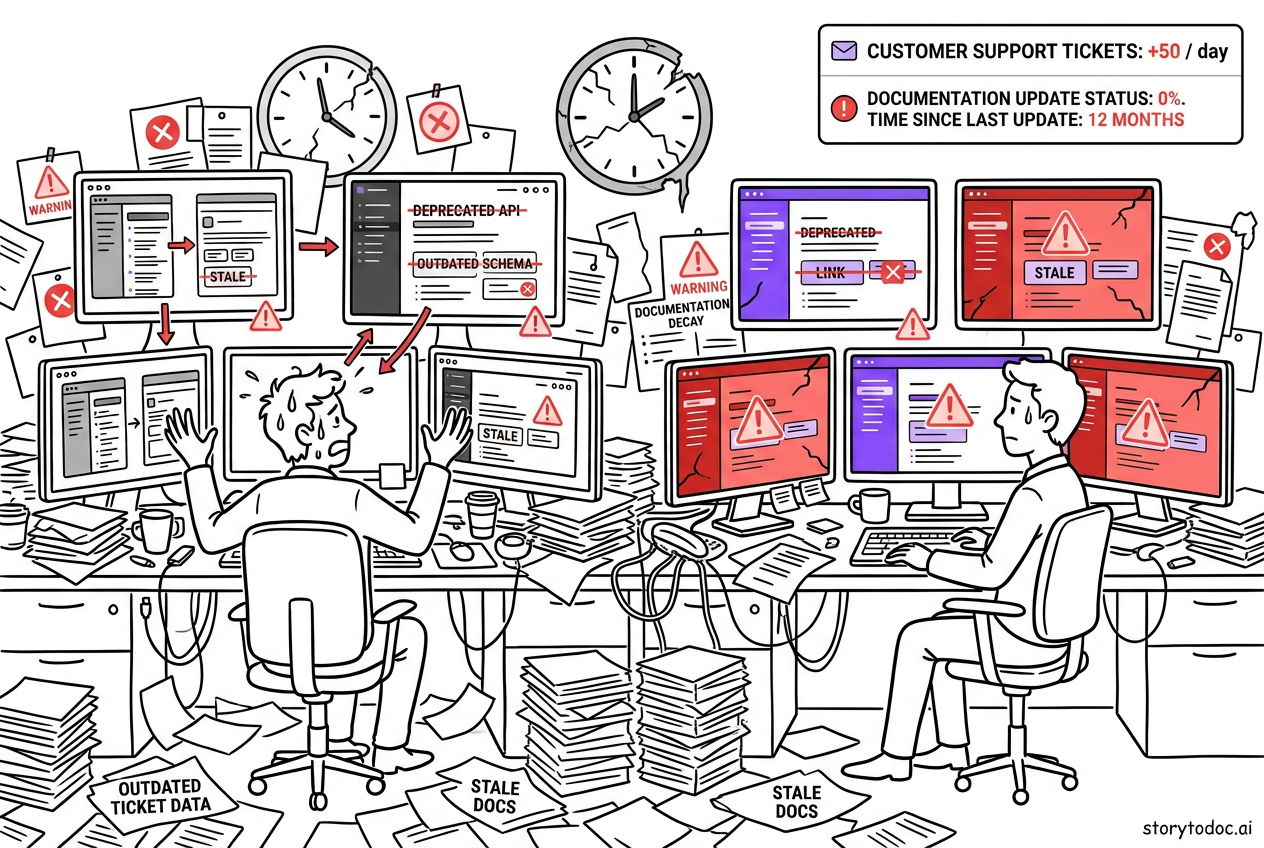
Documentation Decay: What It Actually Costs You
Let's make this concrete.
Every live support interaction costs your team $8-12 to resolve. Every self-service interaction costs $0.10. That's an 80-120x cost difference.
If you handle 500 support tickets per month and could deflect 40% of them with accurate, current documentation:
- Current cost: $5,000/month
- After 40% deflection: $3,000/month
- Annual savings: $24,000
And 40% is conservative. Mature, accurate documentation deflects 40-70% of support tickets. The catch is that "mature, accurate documentation" requires ongoing maintenance, and most teams don't have bandwidth for it.
44% of customers churn due to poor onboarding and unclear product guidance. Outdated docs don't just cost you support hours. They cost you customers.
What to Look for in Product Documentation Software
The best user documentation software for SaaS balances six core capabilities. Most tools do some well. Few do all six.
6 Must-Have Features for SaaS Teams
1. Search that actually works: Users come to documentation with specific questions. If they can't find answers in 30 seconds, they open a support ticket. Prioritize semantic search over basic keyword matching.
2. Version control: Your docs need to track product versions. What was true in v2.3 may not be true in v2.8. Version control prevents users from following outdated instructions for the wrong product state.
3. Multiple content formats: Text guides work for some users. Video works better for others. The best platforms support both, plus PDFs for offline access. Don't pick a tool that locks you into one format.
4. Analytics and usage data: Which articles get the most views? Where do users drop off? What searches return no results? These insights tell you where your documentation is working and where it's failing.
5. Collaboration features: Documentation isn't a solo activity. Your product team, support team, and content team all need to contribute. Look for commenting, review workflows, and role-based permissions.
6. Integration with your existing tools: Your docs need to live where your users are. If your support team uses Zendesk, your docs should embed into Zendesk. If your help center runs on Intercom, your content should publish there seamlessly.
The Question No Buyer's Guide Asks: Who Updates It?
Every buyer's guide covers the six features above. None of them ask the most important question: when your product changes next week, how does your documentation get updated?
The honest answer for most platforms: someone on your team has to do it manually. Identify what changed. Find every affected article. Update each screenshot. Rewrite each step. Repeat next week.
For teams shipping fast, that's not a process, it's a fantasy. Which is why 80% of knowledge bases fall behind. Not because teams are lazy. Because the tools weren't built for product velocity.
Keep this question in mind as you evaluate each tool below.
The 10 Best Product Documentation Software for SaaS [2026]
1. Document360
Best for: Standalone customer-facing knowledge base
Document360 is the most purpose-built product documentation software on this list, built as a dedicated customer-facing knowledge base. Clean editor, strong search, solid analytics, and good branding customization. If your primary goal is a polished, searchable customer help center, Document360 is a market leader for a reason.
Features include AI-powered search, content analytics, multi-language support, and version management. Their SEO optimization tools help your help articles rank in Google, which brings organic traffic to your support content before users even reach your product.
Limitation: Document360 is a publishing platform. It doesn't help you create or update content when your product changes, that's still a manual process on your team.
Best for: Teams that want a professional, standalone help center and have dedicated documentation writers to maintain it.
Pricing: Starts around $149/month for small teams.
2. Confluence (Atlassian)
Best for: Combined internal and external documentation for Atlassian-native teams
Confluence is the grandfather of team documentation. Over 60,000 customers. Deep integration with Jira, Trello, and the rest of the Atlassian suite. If your engineering team already lives in Jira, Confluence is the natural choice for both internal knowledge management and customer-facing help content.
Limitation: Confluence's strength is internal knowledge management. For customer-facing help centers, the user experience is clunkier than dedicated platforms. It also requires more administrative setup than most teams expect going in.
Best for: Mid-to-large engineering-led SaaS teams already using Atlassian products.
Pricing: Starts at $5.16/user/month for small teams.
3. GitBook
Best for: Developer-facing and API documentation
GitBook is built for documentation that developers write and developers read. Clean markdown editor, GitHub sync, excellent navigation structure. If your primary documentation need is API docs, developer guides, or technical references, GitBook is one of the most capable tools available.
Limitation: GitBook is not designed for non-technical users. The GitHub-centric workflow creates friction for product and support teams who want to write help articles without touching pull requests.
Best for: Technical teams producing developer-facing documentation.
Pricing: Free for open-source projects; paid plans start around $8/user/month.
4. Zendesk Guide
Best for: Support-integrated help center for teams already in the Zendesk ecosystem
Zendesk Guide is the documentation layer built into Zendesk's customer service platform. If your support team uses Zendesk, Guide makes it seamless to surface help articles directly in the support workflow. Agents can link articles to tickets. Users can search the knowledge base before submitting requests.
Limitation: Zendesk Guide only makes sense if you're already in the Zendesk ecosystem. Standalone, it's not the most capable documentation tool, better understood as a Zendesk add-on than an independent platform.
Best for: Support-first teams who already use Zendesk and want tightly integrated help documentation.
Pricing: Included in Zendesk Support plans; Suite starts at $55/agent/month.
5. Notion
Best for: Small SaaS teams that want flexible internal documentation
Notion is the Swiss Army knife of documentation tools. Databases, wikis, project management, documentation, all in one flexible workspace. For early-stage SaaS teams that need internal documentation without a massive setup investment, Notion is a practical starting point.
Limitation: Notion is not designed as a customer-facing knowledge base. The user experience for external visitors is limited, search is basic compared to dedicated tools, and there's no documentation-specific analytics to understand how users interact with content.
Best for: Early-stage teams under 30 people that need flexible internal documentation.
Pricing: Free for personal use; Team plan at $10/user/month.
6. Scribe
Best for: Process documentation and SOP creation
Scribe is the fastest way to create step-by-step process guides from screen recordings. You walk through a workflow, Scribe captures every click, and it automatically generates a written guide with annotated screenshots. No editing required.
The problem Scribe solves is real: process documentation takes too long to create, so teams skip it. Scribe removes the creation friction entirely. For SOP creation and internal process documentation, it's one of the most efficient tools available.
Limitation: Scribe generates static screenshots. When your product UI changes, those screenshots are wrong. You get the same maintenance problem as every other tool, just faster to create the initial version.
Best for: Teams that need to document internal processes and SOPs quickly without dedicated writers.
Pricing: Free tier available; Pro starts at $23/user/month.
7. Helpjuice
Best for: Customer-facing self-service knowledge base with strong search
Helpjuice is a dedicated product documentation software platform built around search quality and analytics -- with one of the best search algorithms in the category, designed to surface relevant content even when users search with vague or misspelled terms. Their analytics tell you exactly which searches return no results, which is invaluable for identifying documentation gaps before they become support tickets.
Limitation: More expensive than alternatives without a dramatically differentiated feature set compared to Document360 at a similar price point.
Best for: Customer success teams that prioritize search quality and documentation analytics above all else.
Pricing: Starts at $120/month for up to four users.
8. ReadMe
Best for: API documentation and developer portals
ReadMe is built specifically for API documentation. Interactive API explorers, automatic OpenAPI/Swagger integration, developer changelogs, and usage metrics that show which API endpoints developers actually use. If you're building a developer-facing product, ReadMe is the most complete solution in this category.
Limitation: Narrowly focused on developer documentation. Not designed for customer-facing how-to guides or internal team documentation.
Best for: SaaS products with public APIs where developer documentation is a primary product asset.
Pricing: Starts at $99/month for the startup plan.
9. ClickHelp
Best for: Technical documentation for software companies with dedicated writing teams
ClickHelp is built for technical writing teams that produce large volumes of structured documentation. Single-sourcing (write once, publish to multiple outputs), conditional content (show different content to different user segments), and robust translation support make it an enterprise-grade documentation management system.
Limitation: Steep learning curve. Built for dedicated technical writers, not product managers or support teams creating documentation on top of their primary role.
Best for: Mid-to-large SaaS companies with dedicated technical writing teams managing complex documentation.
Pricing: Starting around $175/month for small teams.
10. StorytoDoc
Best for: Teams that need documentation that stays current as the product changes
StorytoDoc takes a different approach to the product documentation problem. Where every other tool on this list helps you create and publish documentation, StorytoDoc focuses on creating content that doesn't go stale when your product changes.
Here's how it works. You record a product workflow using the free Chrome extension. StorytoDoc automatically generates a complete Story -- an interactive video, a step-by-step how-to article, and a downloadable PDF -- from one recording. You embed that Story wherever your users are: your Zendesk help center, your Intercom knowledge base, your Confluence workspace, or StorytoDoc's embeddable Learning Center.
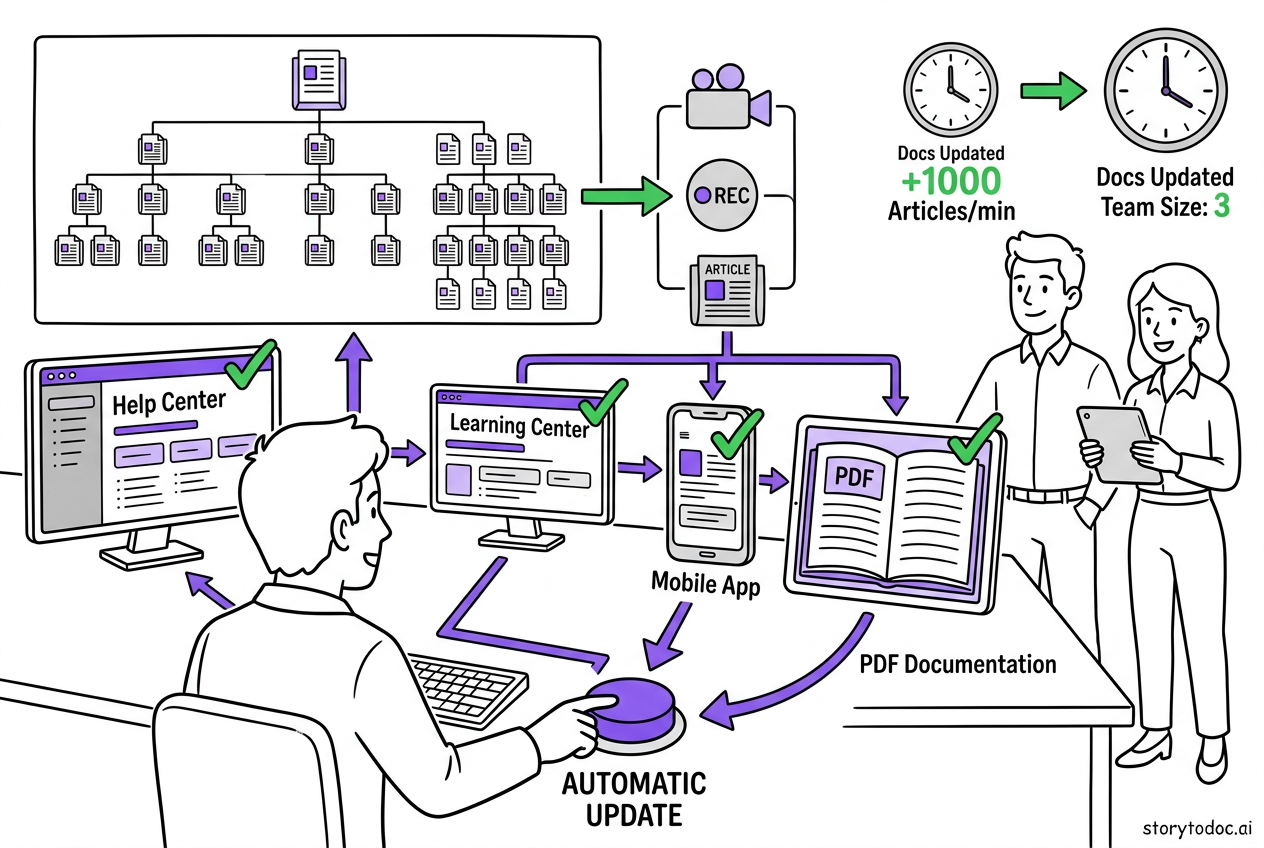
When your product UI changes, one click updates everything. New screenshots, updated steps, refreshed video. All three formats. Everywhere they're published.
This is where StorytoDoc differs from every other tool on this list: it's not a publishing platform. It's the content creation and maintenance layer that feeds your existing platforms. You keep Document360 or Zendesk Guide as your help center, StorytoDoc makes sure the content inside it stays accurate.
For teams shipping weekly updates, this changes the economics of documentation entirely. Every AI documentation tool conversation eventually comes back to the same question: who updates the content when the product changes? StorytoDoc's answer is: one click, done.
Best for: SaaS teams shipping frequent product updates who can't afford to manually maintain documentation across every release cycle.
Pricing: Starter at $49/month (up to 8 users), Growth at $149/month, Custom plans available.
Product Documentation Software Comparison: All 10 Tools at a Glance
| Tool | Best For | Audience | Starting Price | Auto-Updates |
|---|---|---|---|---|
| Document360 | Standalone knowledge base | Customer-facing | ~$149/mo | — |
| Confluence | Internal + external docs | Internal + Customer | $5.16/user/mo | — |
| GitBook | Developer documentation | Developer-facing | $8/user/mo | — |
| Zendesk Guide | Support-integrated help center | Customer-facing | Incl. in Zendesk plans | — |
| Notion | Flexible internal wikis | Internal | $10/user/mo | — |
| Scribe | Process and SOP guides | Internal | $23/user/mo | — |
| Helpjuice | Self-service with strong search | Customer-facing | $120/mo | — |
| ReadMe | API and developer portals | Developer-facing | $99/mo | — |
| ClickHelp | Technical documentation | Technical writers | ~$175/mo | — |
| StorytoDoc | Documentation that stays current | Customer-facing | $49/mo | ✓ Yes |
The pattern that jumps out: nine of the ten tools are publishing platforms (Layer 1). Only one, StorytoDoc, addresses the maintenance problem at the content layer (Layer 2). This is the gap the two-layer framework below explains.
The Two-Layer Documentation Stack
Here's the framework that every product documentation comparison misses.
Most buyer's guides treat product documentation software as a single category: pick a tool, put your docs in it, done. That's the wrong mental model.
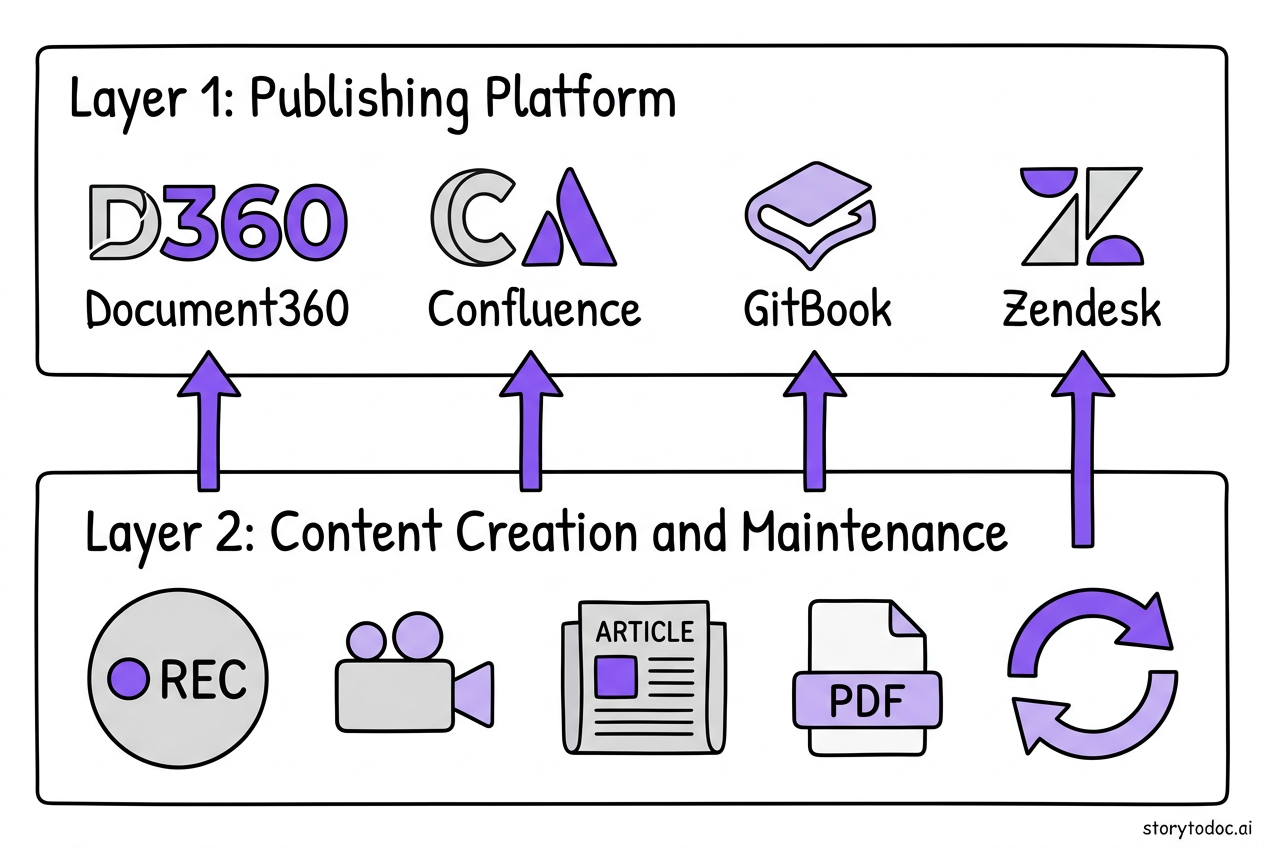
There are actually two distinct layers, and you need both.
Layer 1: The Publishing Platform (Where Docs Live)
This is what most documentation software comparisons cover. Zendesk Guide, Document360, Confluence, GitBook, Notion. These platforms store, organize, and serve your documentation to users.
They're excellent at: structure, search, branding, analytics, access control.
They're not built for: updating content when your product changes. That's still your team's problem.
Layer 2: The Content Creation and Maintenance Layer (Where Docs Are Made and Kept Current)
This is what gets skipped in most evaluations.
Someone has to create the content that goes into Layer 1. And when your product changes, someone has to update it. For most SaaS teams, that "someone" is whoever has time, which means documentation maintenance falls behind product velocity within weeks of launch.
Tools like Scribe solve the creation problem (faster to write the first draft). Tools like StorytoDoc solve the maintenance problem (content auto-updates when the product changes). Both sit in Layer 2, they don't replace your publishing platform, they make the content inside it better and more current.
How the Stack Works Together
The complete product documentation stack for a SaaS team looks like this:
- Record once: Use a Layer 2 tool to capture your product workflow, 5 minutes, not 5 days
- Get full-format content: Interactive video + how-to article + PDF from one recording
- Publish to Layer 1: Embed into Zendesk Guide, Document360, Confluence, or your Learning Center
- Update automatically: When the product changes, one click in Layer 2 updates all Layer 1 instances everywhere they're published
This is how teams reduce support tickets by 40-70% without hiring more documentation writers: they fix the maintenance problem instead of throwing headcount at it.
How to Choose Product Documentation Software for Your SaaS
Different team sizes have different documentation needs. The right product documentation tools for SaaS depend heavily on how fast your product ships and how large your team is. Here's a practical decision framework:
Early-stage SaaS (1-15 people)
- Internal docs: Notion (free, flexible, minimal setup)
- Customer-facing docs: Zendesk Guide if you use Zendesk, or Helpjuice standalone
- Content creation: Scribe for process speed, StorytoDoc if you need video and auto-updates
Growth-stage SaaS (15-100 people)
- Publishing platform: Document360 or Confluence depending on your team structure
- Content layer: StorytoDoc for customer-facing documentation that stays current through weekly releases
- Developer docs: ReadMe or GitBook if you have a public API
Scale-stage SaaS (100+ people)
- Enterprise platform: Confluence, ClickHelp, or Document360 Enterprise
- Content layer: StorytoDoc with Growth or Custom plan for version control across multiple products
- Developer portal: ReadMe with full API analytics
- Learning Center: StorytoDoc's embeddable Learning Center for proactive feature discovery in-product
The question to ask before choosing anything: "When my product ships an update next week, how does this tool help me keep documentation current?"
If the answer is "it doesn't, that's still manual," you need a Layer 2 tool regardless of which Layer 1 platform you pick. Most teams learn this six months after launch when their knowledge base is 60% outdated and support ticket volume is climbing again.
What Actually Makes Documentation Work Long-Term
Creating documentation is a one-week project. Keeping your product documentation software outputs accurate -- every article, every screenshot, every step -- is a forever project.
Every tool on this list solves the one-week problem. The teams that win at documentation solve the forever problem, they build a system where maintenance is automated or dramatically reduced, not just faster.
Here's what that looks like in practice:
Automate creation: Record workflows instead of writing from scratch. A 5-minute screen recording beats a 5-hour writing session for both speed and user comprehension.
Automate updates: When your product changes, your Layer 2 tool should detect affected content and update it without requiring a manual review of every article in your knowledge base.
Track what's outdated: Use analytics to find articles with high exit rates and low satisfaction scores. Those are usually showing the wrong UI.
Build documentation into your release process: Every feature ship should trigger a documentation check. Not as an afterthought, as a release requirement at the same level as QA.
Consider a help center software buyer's guide as your Layer 1 starting point, then layer your content creation workflow on top of whichever platform you choose.
The teams doing this well aren't spending more time on documentation. They're spending dramatically less. Because they built the right stack once, instead of manually rebuilding documentation every time the product ships.
The Bottom Line on Product Documentation Software
The best product documentation software for your SaaS team isn't one tool, it's two layers working together.
Layer 1 (publishing platform): For SaaS documentation software in this tier, choose based on team size, existing tool stack, and primary audience. Customer-facing teams: Document360, Zendesk Guide, Helpjuice. Internal teams: Confluence, Notion. Developer audiences: GitBook, ReadMe.
Layer 2 (content creation and maintenance): Choose based on how often your product ships and how much capacity your team has for manual updates. If your product ships weekly and your team has no documentation headcount, you need a tool that handles updates automatically.
The 80% of SaaS teams with outdated documentation aren't failing because they chose the wrong publishing platform. They're failing because they never solved the maintenance problem.
Start with your biggest pain point. If you don't have a publishing platform, pick one from the list above. If you have a platform but your content is perpetually behind your product, that's the problem worth solving first, and it's the one most documentation software guides never tell you about.
In Doc We Trust.
Ready to see what documentation that updates itself looks like? See StorytoDoc pricing and plans, or start with the free Chrome extension.

![Video Documentation Service: The Complete Guide for SaaS Teams [2026]](/images/blog/video-documentation-service-saas-guide-featured.png)
![10 Best Knowledge Base Software for SaaS [2026]](/images/blog/knowledge-base-software-saas-buyers-guide-featured.png)