
![Customer Training Software for SaaS Teams: 10 Best Tools [2026]](/images/blog/customer-training-software-saas-featured.png)
Most customer training software was built for a world where your product didn't change every two weeks.
Here's the problem: your team spends months building a polished training academy. You record videos, write guides, build course modules. Then your product ships a major update. The navigation changes. A core workflow gets redesigned. Three screens look completely different.
Now your training content is wrong. Not obviously wrong. Subtly wrong. Wrong in exactly the ways that confuse new customers when they follow the steps and nothing matches.
Most customer training platforms don't solve this. They give you great tools to create training content. They give you nothing to keep that content current when your product changes.
This guide covers 10 customer training software tools for SaaS teams in 2026, what to look for when evaluating them, and why the content decay problem is the most important thing most buyers never ask about.
What Is Customer Training Software?
Customer training software is any platform that helps you teach customers how to use your product. It covers the full spectrum: from enterprise learning management systems (LMS) with structured course modules to lightweight video tools to embedded training that lives inside your product.
The category splits roughly into three types:
Traditional LMS platforms (Skilljar, Docebo, TalentLMS) -- built for creating formal course-based training academies. These are comprehensive, highly customizable, and expensive. Typical implementation takes 2-4 months and enterprise pricing starts at $25,000-$50,000+ per year.
Embedded training tools -- training content that lives inside your product, not in a separate academy. Users access it without leaving the app. More relevant to the day-to-day customer experience.
Video-first tools -- platforms built around short how-to videos that explain features in 90 seconds or less, rather than requiring customers to enroll in structured courses.
Who uses customer training software
Customer Success leaders use it to reduce onboarding time and support load. Product Managers use it to drive feature adoption. Customer Education teams use it to build scalable training programs. In smaller SaaS companies, all three jobs are often done by the same two or three people.
The audience for customer training has also shifted. B2B customers in 2026 don't want to enroll in a six-module course. They want to watch a short video when they're stuck, find the answer in 90 seconds, and get back to work.
The Problem With Traditional Customer Training
Before evaluating tools, it's worth understanding why the old model is breaking down.
The course completion myth
Every traditional LMS measures success by course completion rates. How many customers finished Module 3? What was the quiz pass rate?
The problem: course completion is a proxy metric, not an outcome metric. What you actually want to know is whether customers can use your product after training. These are not the same thing.
A customer can complete every module in your training academy and still fail to reach the "aha moment" that drives retention. Completion tells you they watched the content. It tells you nothing about whether they applied it.
The better metric is feature adoption rate after training. Do customers who go through your training actually use the features it covers? That's the number worth tracking.
The content decay problem
This is the one nobody talks about.
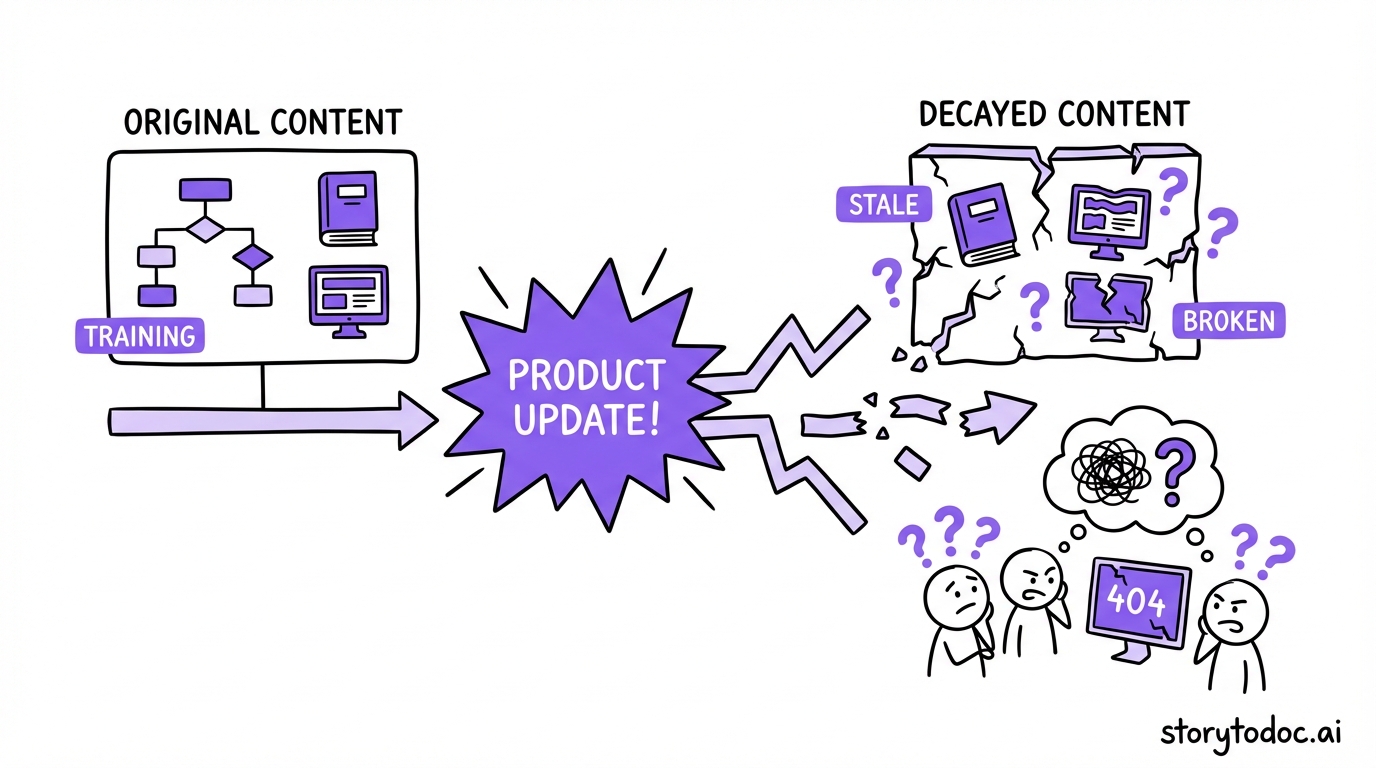
When you build a training academy, you invest significant time and money creating content. Videos. Articles. Slide decks. Interactive demos. Then your product ships an update.
Maybe 20% of your UI changes. A core workflow gets simplified. A button moves. A new feature replaces an old one.
Your training content is now wrong. Partially wrong, in ways that are hard to spot unless you go through every piece manually. And because updating training content is tedious, most teams fall behind.
80% of SaaS help content goes stale within months of a product launch. For training content, the same decay applies -- only the cost is higher, because customers paid to learn from this content.
The shift from course-heavy to video-first training
The format customers prefer has changed. Long course modules made sense when enterprise software was complex and static. Now B2B SaaS products update weekly, and customers want to learn by doing, not by studying.
A 90-second how-to video embedded in the product beats a 20-minute course module in a separate academy -- not because it's shorter, but because it meets users where they are, when they need it.
The best customer training software for SaaS in 2026 reflects this shift.
What to Look For in Customer Training Software
Use these six criteria before you evaluate any platform.
1. Content creation speed. How long does it take to create a new training piece from scratch? For a team without a dedicated customer education lead, this matters a lot. Tools that require scripting, recording, editing, and uploading in separate steps add friction that means less content gets made.
2. Content maintenance -- what happens when the product changes. This is the question most buyers never ask. When your product UI changes, how much manual work does it take to update your training content? For most platforms, the answer is: a lot. Look for tools that have an answer to this problem.
3. Delivery method -- academy vs. embedded in product. Do customers have to leave your product to access training, or is it embedded in their workflow? A separate customer academy is better for structured onboarding programs. Embedded training is better for just-in-time learning during the product experience. Ideally you want both.
4. Analytics -- completion vs. outcome metrics. Good training analytics go beyond course completion. You want to know which training content correlates with feature adoption, retention, and expansion. If the analytics dashboard only shows views and completion rates, that's a limitation worth noting.
5. Integration with your help center. Training and support content should work together. Customers who watch a training video should be able to find the matching help article. Customers who search your help center should find training content, not just text FAQs. Check the integration options carefully.
6. Pricing model vs. team size. Enterprise LMS pricing ($25K-$50K/year) doesn't make sense for a team of 15. Know your budget range before you start evaluating. Several excellent tools in this list are designed for teams that need results without an enterprise contract.
LMS vs. embedded training: how to choose
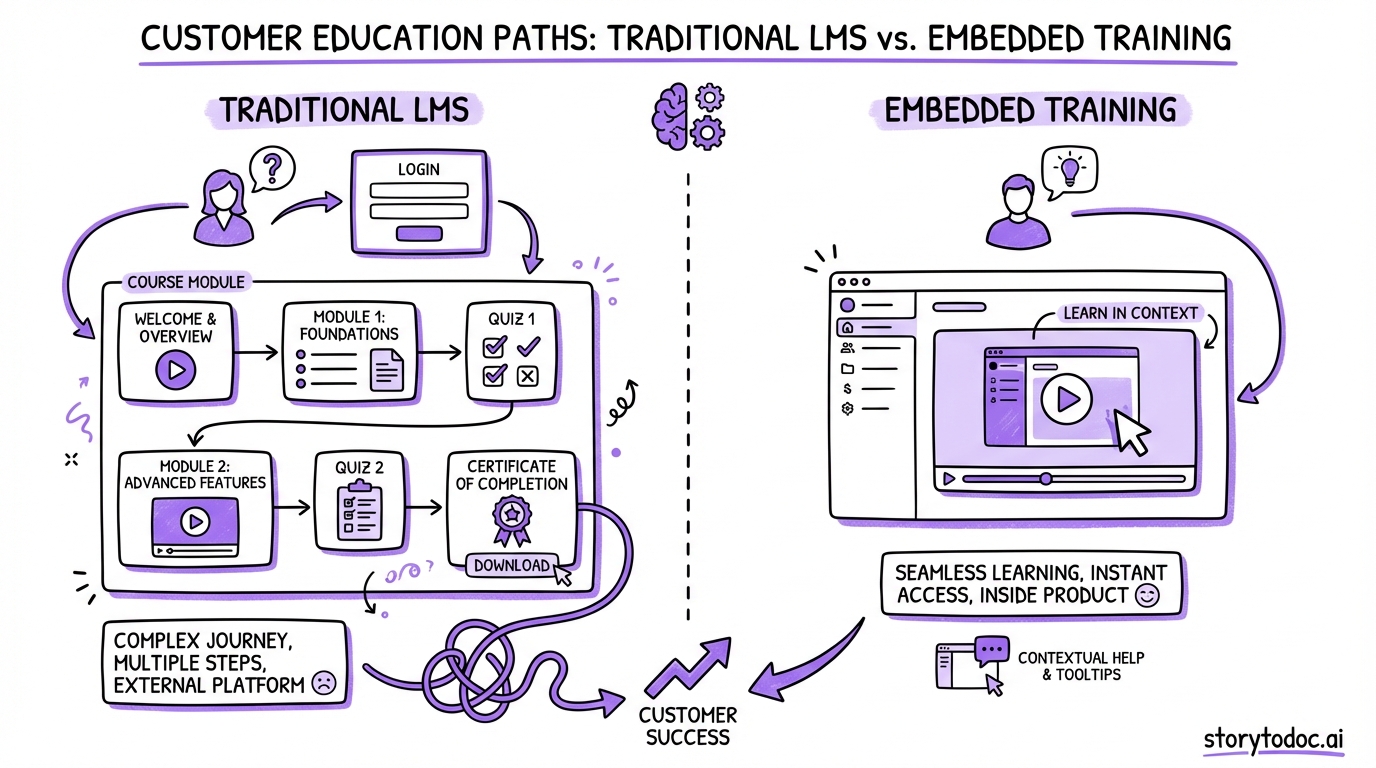
If your primary goal is a structured onboarding program with measurable course completion and formal certification, an LMS like Skilljar or TalentLMS makes sense.
If your primary goal is customers learning features when they need them, staying current as your product changes, and building documentation that reduces support tickets, embedded training is the better model.
Many mature SaaS teams use both: an LMS for new customer onboarding and embedded training for ongoing feature discovery.
10 Best Customer Training Software for SaaS Teams [2026]
1. Skilljar
Best for: Enterprise customer education programs Pricing: $30,000-$50,000+/year
Skilljar is the most established enterprise customer education platform. It's built for teams that want a fully branded training academy with course certification, learning paths, and detailed completion analytics.
Its strengths: deep customization, SSO integration, robust reporting, and a strong track record with enterprise SaaS companies. If you have a dedicated customer education team and budget to match, Skilljar is the category leader.
Its limitation: it's a significant investment to set up and maintain. Every time your product changes, your Skilljar content needs manual updates. For teams shipping fast, that maintenance load compounds quickly.
2. Docebo
Best for: Large-scale AI-personalized learning Pricing: $25,000+/year
Docebo combines LMS functionality with AI-powered learning personalization. It recommends training content based on user behavior, role, and progress -- which is genuinely useful at scale.
Strong choice for enterprise teams that need to serve thousands of customers across different segments with tailored learning paths. The AI features are real, not marketing language.
The limitation: enterprise complexity and pricing. Not built for small or mid-market teams.
3. TalentLMS
Best for: SMB-friendly LMS with fast setup Pricing: From $119/month
TalentLMS is the accessible version of the LMS category. It covers the core features: course creation, learning paths, quizzes, certificates, and basic reporting. Implementation is faster than Skilljar or Docebo, and pricing is accessible for teams under 100 customers.
Good starting point if you've decided you need an LMS and aren't ready for enterprise pricing. Less powerful than Skilljar for large-scale programs but much faster to launch.
4. Thought Industries
Best for: Companies building customer academies as a revenue line Pricing: Custom (enterprise)
Thought Industries is built for "customer learning" as a business strategy -- not just as a support cost. It supports paid training programs, subscription-based learning content, and detailed ROI tracking.
Relevant for SaaS companies that want to monetize their training content or build a premium certification program that customers pay for.
5. Northpass
Best for: Mid-market customer education Pricing: Custom
Northpass sits between the enterprise complexity of Skilljar and the simplicity of TalentLMS. It's built for customer success teams that need more than a basic LMS but don't have a full-time customer education staff.
Worth evaluating for mid-market SaaS companies (100-1,000 customers) that want structured onboarding programs without enterprise implementation timelines.
6. Beetsol
Best for: Search-first customer training Pricing: From $299/month
Beetsol takes a different angle: instead of course completion, it optimizes for search. Customers find training by searching for what they need, not by navigating course menus.
This aligns with how B2B customers actually learn: they're in the product, they hit a problem, they search for how to fix it. Beetsol surfaces the right training content at the right moment.
7. Guideflow
Best for: Interactive demo-based training Pricing: From $40/month, free plan available
Guideflow creates interactive product simulations -- not videos or articles, but guided walkthroughs where customers click through a replica of your product UI. It's the most tactile training format: customers learn by doing, not watching.
Good for pre-onboarding training (showing prospects what the product does before they sign up) or for feature-specific training that requires hands-on experience.
8. Loom
Best for: Quick async video how-tos Pricing: Free plan available, from $12.50/user/month
Loom isn't a training platform in the traditional sense, but it's often the fastest way for a small CS team to create training videos. Record your screen, add narration, share a link. No editing required.
The limitation: Loom is for creating individual videos, not building a structured training program. There's no course architecture, no learning paths, and no analytics beyond view counts. Use it to supplement a training platform, not replace one.
9. Intercom
Best for: Integrating training with conversational support Pricing: Custom (based on seats and usage)
Intercom has expanded well beyond support messaging into in-app training. If you're already using Intercom for customer support, its product tours, targeted messages, and help center features can serve as a lightweight training layer.
The benefit: it's one platform. The limitation: training is not Intercom's core product. For teams that need deep training analytics or structured learning paths, you'll hit the ceiling quickly.
10. StorytoDoc
Best for: Auto-updating video training that stays current when your product changes Pricing: See storytodoc.ai/pricing
StorytoDoc takes a different approach to customer training. Instead of building a course, you create a Story. Each Story is an interactive video, a step-by-step how-to article, and a downloadable PDF -- all generated from one screen recording.
Those Stories embed directly into your help center (Zendesk, Intercom, Confluence) and in a proactive Learning Center that lives inside your product. When your product UI changes, StorytoDoc detects the changes and updates all three formats automatically, everywhere they're published.
This solves the content decay problem. Your training videos show the current UI. Your help articles match what customers see in the product. Your PDFs are accurate for training sessions.
For SaaS teams shipping fast, this changes the training math. Instead of budgeting for quarterly content audits and manual updates, you create training once and let it stay current.
The trade-off: StorytoDoc is not a course platform. There's no formal learning path or certification module. It's built for teams who want to train customers through embedded, self-serve content -- not a structured academy. For teams that need both, the Learning Center and an LMS can work in parallel.
Comparison Table
| Tool | Best For | Starting Price | Key Strength | Main Limitation |
|---|---|---|---|---|
| Skilljar | Enterprise customer education | $30K/year | Full academy, certifications | Expensive, heavy maintenance |
| Docebo | AI-personalized learning at scale | $25K/year | Smart personalization | Enterprise cost and complexity |
| TalentLMS | SMB-friendly LMS | $119/mo | Fast to launch | Less powerful at scale |
| Thought Industries | Paid training programs | Custom | Training as revenue | Complex for basic use cases |
| Northpass | Mid-market education | Custom | CS team-friendly | Limited public pricing info |
| Beetsol | Search-first training | $299/mo | Meets users where they search | Newer, smaller ecosystem |
| Guideflow | Interactive demo training | $40/mo | Hands-on product simulation | Not a full LMS |
| Loom | Quick async video | $12.50/user/mo | Fastest to create | No training structure |
| Intercom | Support + training blend | Custom | One platform | Training not core product |
| StorytoDoc | Auto-updating embedded training | See pricing | Content stays current | No course/certification layer |
The Modern Approach: Embedded Training That Updates Itself
The shift in customer training isn't just about format. It's about where training lives and how it stays accurate.
Why customers don't enroll in courses anymore
The "build an academy" model made sense in 2018. Products were more static. Customers expected to learn via structured training before using the product.
Today, most SaaS customers expect to start using the product first and learn as they go. They want training embedded in the product experience, available when they need it, in the format that's fastest to consume.
When a customer gets stuck on a feature, they don't want to log into a separate academy and find the right course. They want to see a quick video or read a clear how-to, right there, and get back to work.
Video + article + PDF: the three-format training standard
The most effective training covers three formats because different customers learn differently:
- Video -- for customers who learn by watching. A 90-second screen recording showing exactly how to complete a task.
- How-to article -- for customers who skim headings and refer back to steps. Text format with numbered steps and screenshots.
- PDF -- for customers who want to download and reference offline, or who share training guides with their team.
Creating these three formats separately is the old way. It takes weeks and goes stale. The better model: record once, generate all three formats automatically, and let them update when the product changes.
Embedding training in your product vs. building a separate academy
Both approaches have merit. A separate academy (Skilljar, TalentLMS) works well for structured new customer onboarding where you need to track completion and measure progress through defined stages.
Embedded training works better for ongoing feature adoption. When a customer opens a feature they haven't used before, a contextual training prompt that links to a 90-second video is more effective than telling them to visit your academy.
The best-performing SaaS teams use both: a structured onboarding program for the first 30 days, and embedded training available throughout the customer lifecycle for feature discovery.
What happens when your product changes
This is where most customer training investments break down.
Every tool in this list, with one exception, creates training content that you update manually. When your UI changes, you log back into Skilljar or TalentLMS, identify which courses are now wrong, and update them piece by piece.
For teams shipping updates weekly, this maintenance load is significant. It's why auto-updating documentation is becoming a core requirement, not a nice-to-have.
How to Build a Customer Training Program
You don't need to start with a $50K platform and a dedicated team. Here's a practical framework for getting started.
Step 1: Map your golden path
Your golden path is the set of 3-5 features every customer must understand and use to get value from your product. Not every feature -- just the ones that predict whether a customer stays past 90 days.
Map it by looking at your retention data. What do customers who renew do that customers who churn don't? The answer is usually: they discover and use 2-3 specific features that churners never found.
Step 2: Create training content for each step
For each golden path feature, create training content in three formats: video (90-120 seconds), how-to article (400-600 words), and PDF reference guide. Cover the most common support questions for each feature.
This doesn't have to be a full production. A clear screen recording with narration is more useful than a polished video that took three weeks to make. Accuracy matters more than production quality.
Step 3: Embed in help center and in-product Learning Center
Get the training into the two places customers actually look: your help center (where they search when stuck) and your product (where they are when they need to learn something).
Embedding in Zendesk or Intercom is straightforward. Embedding in the product usually means adding a Learning Center widget -- a persistent panel where customers can find training without leaving the app.
For more detail on the in-product layer, the customer onboarding complete guide covers the full setup process.
Step 4: Measure outcomes, not completion
Set up tracking for the metrics that actually matter:
- Feature adoption rate after training (do customers use the feature they trained on?)
- Time-to-first-value (does training reduce the time from signup to activation?)
- Support ticket volume for trained topics (does good training mean fewer tickets on those features?)
- 90-day retention for customers who engaged with training vs. those who didn't
These numbers tell you whether your training is working. Completion rates tell you whether customers opened the content.
For a deeper look at the connection between training quality and retention, how documentation reduces churn breaks down the data in detail.
Quick Start: What You Can Do This Week
If you're not sure where to begin, start here:
- Identify your golden path features -- the 3-5 features that predict 90-day retention in your data
- Audit your existing training content -- for each golden path feature, is there accurate, current training available?
- Record one 90-second how-to video for the feature with the highest support ticket volume
- Check what format your customers actually use -- do they watch videos, read articles, or download PDFs? Your support tickets will tell you
You don't need a $50K platform to start. You need accurate training content for the features that matter most. Start there, measure the impact, then invest in the platform that fits your scale.
Conclusion
Customer training software has expanded well beyond the LMS model of a decade ago. The best teams in 2026 aren't building training academies and hoping customers enroll. They're embedding training where customers work, in formats customers prefer, and making sure that content stays accurate as the product evolves.
The tool that's right for your team depends on your scale, your budget, and how fast your product ships changes. Enterprise teams with dedicated customer education resources should evaluate Skilljar or Docebo. Small and mid-market teams that need something running this quarter should look at TalentLMS, Guideflow, or StorytoDoc.
What every team should avoid: investing heavily in training content, shipping a product update, and spending months manually fixing everything that broke.
Build training that updates when your product does. Your customers will feel the difference.
In Doc We Trust.

![Video Documentation Service: The Complete Guide for SaaS Teams [2026]](/images/blog/video-documentation-service-saas-guide-featured.png)
![10 Product Documentation Tools for SaaS [Compared 2026]](/images/blog/product-documentation-software-saas-featured.png)